
The best place to buy computer desks depends on how the desk reaches your room. IKEA, Staples, and Walmart let you carry a flat-pack carton home the same day; Amazon, Wayfair, and the sit-stand brands sell far more sizes but often ship oversized frames by curbside freight. Measure first. A 47-inch top that fits an alcove and a 55-inch top that blocks a door look identical in listing photos.
This page contains affiliate links. We may earn a commission at no extra cost to you.
Desk or Table? What the Knee Space Tells You
A computer desk is a work surface built to hold a computer monitor, a computer keyboard, a mouse, and a desktop computer at seated height, with the knee clearance and cable routing a dining table cannot give you. Tables carry an apron and stretchers exactly where your legs need to go. A computer table or office table in a listing usually means the same furniture.
People who work from home, students, and gamers with a tower and its peripheral clutter all want the same workspace: a stable surface at the right height. The standard height for a computer desk is 28 to 30 inches, sized so your elbows land near a 90-degree angle on the keys. Workstation guidance from OSHA, the federal agency that publishes US workplace safety standards, puts the working elbow angle between 90 and 120 degrees with the thighs clearing the underside. If your build involves a tower and a pile of computer parts, plan the space underneath first.
Sizing by Monitor Distance and Standing Height
Two numbers settle most sizing questions: how far your eyes end up from the screen, and whether a sit-stand frame reaches your standing elbow height with the top installed.
Depth: work backward from the screen
The OSHA monitor guidance gives a preferred viewing distance of 20 to 40 inches, measured from your eyes to the front of the screen, with the top of the screen at or slightly below eye level. Run the math on a 24-inch-deep top. A stock stand pushed to the back usually leaves the screen face several inches forward of the rear edge (check the stand depth on the spec sheet). Call it 6 inches, so the screen sits 18 inches from the front edge. Your eyes sit roughly 6 inches behind that edge while typing, so you land near two feet: inside the range, but at the close end.
A 30-inch-deep top moves the same screen to about 30 inches, the comfortable middle. In a room that only takes a shallow top, a clamp-on arm or one of the slim monitor stands recovers that distance. Two 27-inch screens side by side change width instead, needing roughly 50 inches of surface space.
Standing range: measure your elbow, then read the spec
For a height adjustable desk, what matters is the top of its range with the desktop installed. Stand in your work shoes, bend your elbows to 90 degrees, and measure floor to forearm. Say that is 45 inches and your keyboard is about an inch tall at the home row: you want the tabletop near 44 inches. The FlexiSpot E7 frame is listed at 22.8 to 48.4 inches before a top is added, and FlexiSpot’s own spec table puts it at 23.8 to 49.4 inches with a 1-inch desktop, so that user has room to spare.
Frames sold as meeting BIFMA G1-2013, the ergonomics guideline from the Business and Institutional Furniture Manufacturers Association, commonly list about 22.6 to 48.7 inches, and Uplift notes that compliance figure assumes a 1-inch desktop. Tall users should compare their standing elbow height against the maximum with the real top thickness included, because a frame that stops short leaves the keyboard below the elbows all afternoon.
Types Compared: Fixed, L-Shaped, Corner, Sit-Stand, Gaming
Pick the type from the room first and the work second. A two-monitor workstation wants 55 inches or more of width, and a top near 48 inches holds one display.
| Type | Fits best | Watch for |
|---|---|---|
| Fixed straight desk | Most home office rooms, one or two screens | Fixed height, so the chair does all the adjusting |
| L shaped desk | Corners, multi-monitor setups, a second work area for paper | Delivery path and which side the return goes on |
| Small corner desk | Bedrooms, a small office, or a small space near 40 inches wide | Shallow depth pushes the screen too close |
| Sit-stand (electric standing desk) | Long workdays, shared desks with preset heights | Motor count, height range with the top on |
| Gaming desk | Work and play on one surface, large displays | Novelty trim that adds width without adding depth |
| Writing desk or study table | Laptop-first use, a home office or study corner | No grommets and no tower clearance |
An L-shaped executive desk is the heavy end of the corner category, with a pedestal and a deeper return; it suits a dedicated office space and rarely survives a narrow stairwell. On gaming desks the useful part is the cable routing, while a gaming desk with LED light strips is mostly paying for styling.
Build, Storage, and Cable Features Worth Paying For
Laminate or hardwood. The core under the finish predicts longevity better than styling does, and a sturdy metal frame carries the load whichever top you pick.
| Build | Tier | How it ages | Monitor arm clamp |
|---|---|---|---|
| Particleboard or MDF under laminate | Budget | Edges swell if liquid reaches the core | Use the backing plate |
| Solid wood or bamboo | Mid to premium | Refinishable, lasts decades | Clamps securely |
| Steel frame, swappable wood top | Mid to premium | Frame outlives the top | Check panel thickness |
Weight capacity as the maker states it. Every frame publishes a rated load. Treat the manufacturer’s figure as the ceiling for everything on top, monitor arm and tower included. The FlexiSpot E7 frame, for example, is rated at 355 pounds.
Sit-stand mechanism and motor warranty. Dual-motor frames drive each leg independently, so a height adjustable model lifts faster and stays steadier than a single-motor unit. Check the motor and controller warranty separately from the frame warranty. Standing a lot? An anti-fatigue mat beats another hundred dollars of frame.
Storage that matches your mess. A computer desk with drawers on one side keeps the knee well clear. A hutch or a desk with storage shelves adds room above the work area, and an open shelf underneath keeps a printer off the floor. For paper, pick a desk with file drawer space or slide a filing cabinet underneath.
Cable management, power, and assembly. Grommets and a rear routing channel keep cords off the carpet, and a desk with power outlet strips built in saves an extension run. On sit-stand models every cable has to tolerate the full lift travel. Easy assembly means one top, four legs, pre-drilled holes.
- Tape the listed width and depth onto the floor, then live with that footprint for a day.
- Add roughly three feet behind it for chair roll-back.
- Measure the narrowest doorway, stair turn, and hallway the carton must clear.
- Check working height against your seated elbow position, not against the room.
- Confirm outlet location, because a spot with no power behind it becomes a cord problem.
Where to Buy Computer Desks In Store
Buying in person lets you push on the frame, feel the finish, and check height against your own body. It also sidesteps freight, since most flat-packed cartons fit in a car.
IKEA
IKEA is the strongest option for affordable home office furniture you can see assembled first, since showrooms display finished room sets rather than boxes. The MICKE line covers compact desks with side storage, and the sit-stand range covers height adjustable frames well under specialty pricing. Check the current listing, since lines change by market.
Staples, Office Depot, and OfficeMax
Staples carries office desks, chairs, and storage in most locations, and it is one of the few chains where you can test a chair and a surface height together. Office Depot and OfficeMax run a similar mix from a shrinking store count, and floor selection at all three is narrower than the website. Browse their selection here.
Best Buy
Best Buy stocks gaming desks weighted toward builds with LED lights, hooks for headphones, and cable channels. Electronics retailers tend to run shorter return windows than furniture stores, so confirm terms at checkout. Stock shows per store on their category page.
Walmart, Target, Costco, and Sam’s Club
Walmart and Target carry budget desks in the furniture aisle, and both take orders for store pickup, which dodges freight scheduling. Costco and Sam’s Club rotate smaller premium selections, often Bayside Furnishings and Tresanti, including electric standing desk models. Pottery Barn, West Elm, and Crate and Barrel sit above all of them on price.
Where to Buy Computer Desks Online
Online is where the selection lives, since no warehouse can floor hundreds of sizes. You cannot test stability through a screen, so product page detail and return terms carry the decision.
Amazon
Amazon, the largest online retailer in the US, spans every desk price tier with filters for width, material, and rating. Speed depends on size: parcel-sized models move fast, while oversized sit-stand frames often ship freight regardless of Prime. Start at their category page. #ad
Wayfair
Wayfair runs one of the deepest home office desk catalogs online, and its listings carry buyer-submitted room photos showing finishes under real lighting. Check whether an item ships parcel or curbside freight.
Sit-stand and gaming brands direct
Uplift, Flexispot, Branch, and Autonomous sell adjustable height frames from their own sites, usually with longer motor warranties and more top choices than a reseller offers. Secretlab covers the gaming side. Direct is also the only reliable route to a replacement controller or leg later.
eBay, marketplaces, and used office furniture dealers
eBay suits overstock and secondhand buys, and its local pickup filter removes shipping cost entirely. Facebook Marketplace and OfferUp are stronger for same-city pickup. The bigger opportunity is the channel almost every guide skips: regional liquidators selling inventory pulled from closed corporate offices, which puts commercial-grade steel frames and solid wood tops from Steelcase, Herman Miller, and Haworth below new pricing.
| Retailer | Shipping | Published return window | Note |
|---|---|---|---|
| Amazon | Parcel, freight when oversized | 30 days, most furniture | Sellers set their own terms |
| Walmart | Parcel or store pickup | 90 days, most items | Pickup gives you a counter |
| Wayfair | Parcel or curbside freight | 30 days, most items | Return shipping deducted |
| IKEA | Carry out or delivery | 365 days unopened, 180 opened | Assembled is harder |
Those are standard published policies as of September 2026, not a guarantee for your item. Marketplace sellers and assembled units often fall outside the headline window. Unsure about fit? Buy from the longest window.
Five Mistakes That Send a Desk Back
- Trusting the photo. Listing images are staged in oversized rooms; the listed width, depth, and height are the only honest data.
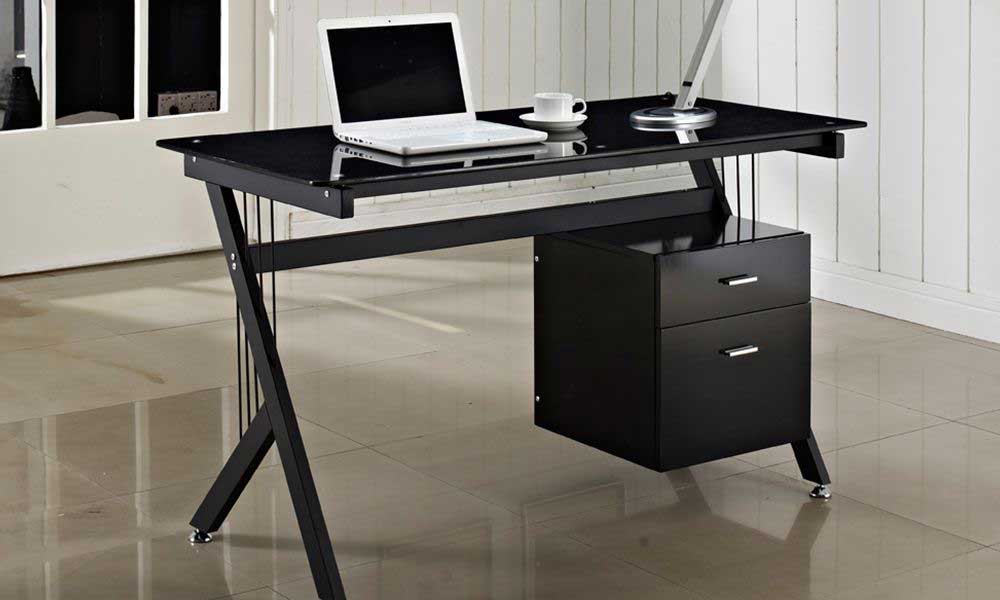
- Glass tops. Glass shows every fingerprint, chips at the corners, and gives monitor arm clamps nothing safe to grip.
- Assuming two motors. If the description does not name two, assume one, and expect more wobble at standing height under load.
- A heavy arm on a thin panel. A clamp concentrates load on a narrow strip of the rear edge, and hollow-core panels crack under it.
- Ignoring how it arrives. Freight often stops at the curb, and freight returns mean paying to send the pallet back.
When a Different Setup Beats Buying a Desk
Three alternatives solve the same problem, and one is often the better call.
A sit-stand converter on a table you own. A riser adds standing without replacing anything, as long as the table has no apron eating your knee room.
A writing desk plus a monitor arm. It is shallower, with no tower clearance or grommets, but a clamp-on arm recovers the depth for laptop-first days in a bedroom.
A bare frame plus your own tabletop. Most sit-stand makers sell frames alone. Add a butcher block or cut-to-size panel for an exact width and better material, usually below the bundle price.
Skip the category if you work from a laptop under an hour a day with no spare floor space. A lap desk and a decent chair cover that, at a fraction of a full office furniture setup.
Top Picks by Room and Use
Selected on frame construction, the load rating each maker states, and buyer reports on how the build goes. Prices move often, so check the current listing.
Best overall: SHW 55-Inch Home Office Computer Desk. Wide laminate top on a sturdy metal frame with cable grommets, stable enough for a dual-display build. Budget tier. Check price on Amazon
Best budget: CubiCubi 40-Inch Small Computer Desk. Compact footprint, steel legs, and a fabric side storage bag that swallows the cable mess. The cheapest of the five. Check price on Amazon
Best L-shaped: GreenForest L-Shaped Corner Desk. Two surfaces meeting at a corner, with a shelf beneath on most configurations for a CPU stand. Reversible for either wall. Check price on Amazon
Best sit-stand: FlexiSpot E7. Dual-motor steel frame with programmable preset heights, a listed 22.8 to 48.4 inch range before the top, and a 355-pound rating. Sold bare or bundled with a top. The priciest pick here. Check price on Amazon
Best for gaming: Atlantic Gaming Desk. Raised monitor stand, headphone hook, cup holder, speaker trays, and cable routing, sized for one large display. Pairs with the tower builds in our guide to gaming computers. Check price on Amazon
Start with tape on the floor and a tape measure on your elbow, shortlist the two or three computer desks that fit both numbers, then compare return windows before prices. Pair whatever you choose with a properly adjusted office chair and a computer mouse that sits level with the keyboard, because the surface and the seat only work as a set.
Frequently Asked Questions
What are good dimensions for a computer desk?
Around 48 inches wide by 24 inches deep suits one display; 55 inches or wider suits two. The dimension shoppers forget is the delivery path: US interior doorways commonly run 30 to 32 inches wide, so a 30-inch-deep carton usually clears where a large corner section will not.
Can any top hold a monitor arm?
No. A C-clamp needs a flat rear edge with no lip, apron, or trim in the way, plus panel thickness inside the clamp’s rated range, printed in the arm’s specs. Hollow-core laminate needs the backing plate.
How long is the warranty on a sit-stand motor?
It varies by maker, and the frame, the motors, and the controller are often covered for different lengths on the same product. Read the warranty page rather than the product page, since the headline number usually describes the frame.
Is a computer desk the same as a writing desk?
No. A computer desk assumes hardware: deeper surface, cable grommets, often a keyboard tray or tower shelf. A writing desk is shallower, usually 20 to 22 inches, with no cable routing. If a tower is part of the plan, the shallower option will fight you.
Should the PC tower sit on the floor or on the desk?
Keep it off the carpet either way. A tower on carpet pulls fibers and dust into its bottom intake, so a CPU stand or hard shelf is the fix on the floor; on a large desk it stays cleaner but eats surface space.
Is used office furniture worth buying?
For commercial-grade builds, often yes. Corporate liquidations put steel-frame workstations on the used market below new retail, and those pieces were engineered for daily eight-hour use. Inspect the lift mechanism and drawer slides in person.
Reviewed by the wheretobuyguides.com editorial team. Return terms reflect published retailer policies as of September 2026; height ranges and load ratings come from manufacturer listings, and ergonomic figures from the OSHA computer workstations eTool.